

UETMULIK
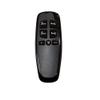
Uetmulik Non-Universal Adjustable Bed Richmat HJH13D Remote Control Replacement
CHF91.79
CHF152.97
-
 Order within to get between
 -
 Tracked Shipping on All Orders
-
 14-Day Returns
- Secure Payments
-
 24/7 Customer Support
Description
- This is Non-universal Adjustable Bed Richmat HJH13D Remote Control Replacement
- This remote is not universal bed remote, only for Milemont and Lucid Adjustable Bed, cannot replace the other Brand of Adjustable Beds, includes BeautyRest and Classic Brands Adjustable Bed
- This remote does not have a massage function. So if your adjustable bed has a massage function, then our remote can not be used. Please attempt the following 4 matching methods, you can proceed according to the steps
- There are several versions of this remote model HJH13D, different versions have different functions and buttons, please match your remote button, if the buttons are different from ours, this product will not replace your remote
- The remote used 2 AAA batteries, which need to be purchased separately, if any questions on your remote please contact us anytime
This is non-universal adjustable bed richmat hjh13d remote replacement. This remote is not universal bed remote, only for Milemont and Lucid adjustable bed, cannot replace the other brand of adjustable beds, includes BeautyRest and Classic Brands adjustable bed. The remote used 2 AAA batteries, which need to be purchased separately. If any questions on your remote please contact us anytime.
The remote will not come paired, so please follow one of these instructions or use your bed's current pairing instructions:
Method 1:
Step1: Ensure the bed base is powered on.
Step2: Locate the pairing button on the control box. This is often a small button, sometimes recessed, labeled "Pair"or "Learn".
Step3: Press and hold the pairing button on the control box for approximately 3-5 seconds until an indicator light (often blue or green)begins to flash.
Step4: Immediately after the light flashes, on the remote press and hold the "head up" button and the "foot up" button at the same time for 10 seconds
Step5: The indicator light on the control box should stop flashing and remain solid, or the bed base may briefly move,indicating successful pairing.
Step6: Test all functions on your remote control to ensure proper operation of the bed base.
Method 2:
Step1: Ensure the bed base is powered on.
Step2: Locate the pairing button on the control box. This is often a small button, sometimes recessed, labeled "Pair"or "Learn".
Step3: Press and hold the pairing button on the control box for approximately 3-5 seconds until an indicator light (often blue or green)begins to flash.
Step4: Immediately after the light flashes, on the remote press and hold the "head up" button and the "foot down" button at the same time for 10 seconds
Step5: The indicator light on the control box should stop flashing and remain solid, or the bed base may briefly move,indicating successful pairing.
Step6: Test all functions on your remote control to ensure proper operation of the bed base.
Method 3:
Step1: Ensure the bed base is powered on.
Step2: Locate the pairing button on the control box. This is often a small button, sometimes recessed, labeled "Pair"or "Learn".
Step3: Press and hold the pairing button on the control box for approximately 3-5 seconds until an indicator light (often blue or green)begins to flash.
Step4: Immediately after the light flashes, on the remote press and hold the "head down" button and the "foot up" button at the same time for 10 seconds
Step5: The indicator light on the control box should stop flashing and remain solid, or the bed base may briefly move,indicating successful pairing.
Step6: Test all functions on your remote control to ensure proper operation of the bed base.
Method 4:
Step1: Ensure the bed base is powered on.
Step2: Locate the pairing button on the control box. This is often a small button, sometimes recessed, labeled "Pair"or "Learn".
Step3: Press and hold the pairing button on the control box for approximately 3-5 seconds until an indicator light (often blue or green)begins to flash.
Step4: Immediately after the light flashes, on the remote press and hold the "head down" button and the "foot down" button at the same time for 10 seconds
Step5: The indicator light on the control box should stop flashing and remain solid, or the bed base may briefly move,indicating successful pairing.
Step6: Test all functions on your remote control to ensure proper operation of the bed base.
Note: This remote is not universal bed remote, it does not come paired and synced and you will need to pair it according to the instructions of the adjustable bed base. There are several versions of this remote model HJH13D, different versions have different functions and buttons, please match your remote button, if the buttons are different from ours, this product will not replace your remote. This remote does not have a massage function. So if your adjustable bed has a massage function, then our remote can not be used.
Shipping and Returns
- We offer tracked shipping on all orders. Tracking information will be shared as soon as the order is dispatched.
- Please check the delivery estimate before adding a product to the cart. This is displayed for every product on the website.
- Available shipping methods and charges will be displayed at the time of checkout, depending on your exact location.
- All customers are entitled to a return window of 14 days, starting from the date of delivery of the product(s).
- Customers are advised to read our return policy for details of the return process, eligibility, refunds as well as cancellations or exchanges.
- In case of any issues or concerns about Shipping or Returns, please contact us and we will be happy to help.
Uetmulik.
Uetmulik Non-Universal Adjustable Bed Richmat HJH13D Remo...
CHF91.79
CHF152.97